Monolithic and layered structures
Video coming soon
Monolithic and layered structures
Recorded by Dr. Krithika L.B. Slot m1-monolithic-layered
How millions of lines of kernel code are organised: monolithic, layered, microkernel and modular designs — and the hybrids real systems actually use.
By the end of this session you should be able to:
The Linux kernel has more than 30 million lines of code. A system that large and that critical has to be engineered so that it can be understood, debugged, extended and kept fast. The usual approach is to split the work into components with clear interfaces — but where the boundaries are drawn, and whether crossing them is cheap or expensive, defines four classic structures: monolithic, layered, microkernel and modular.
Performance wants everything in one address space with plain function calls. Reliability, security and maintainability want components isolated so that a bug in one cannot corrupt another. Every structure below is a different compromise.
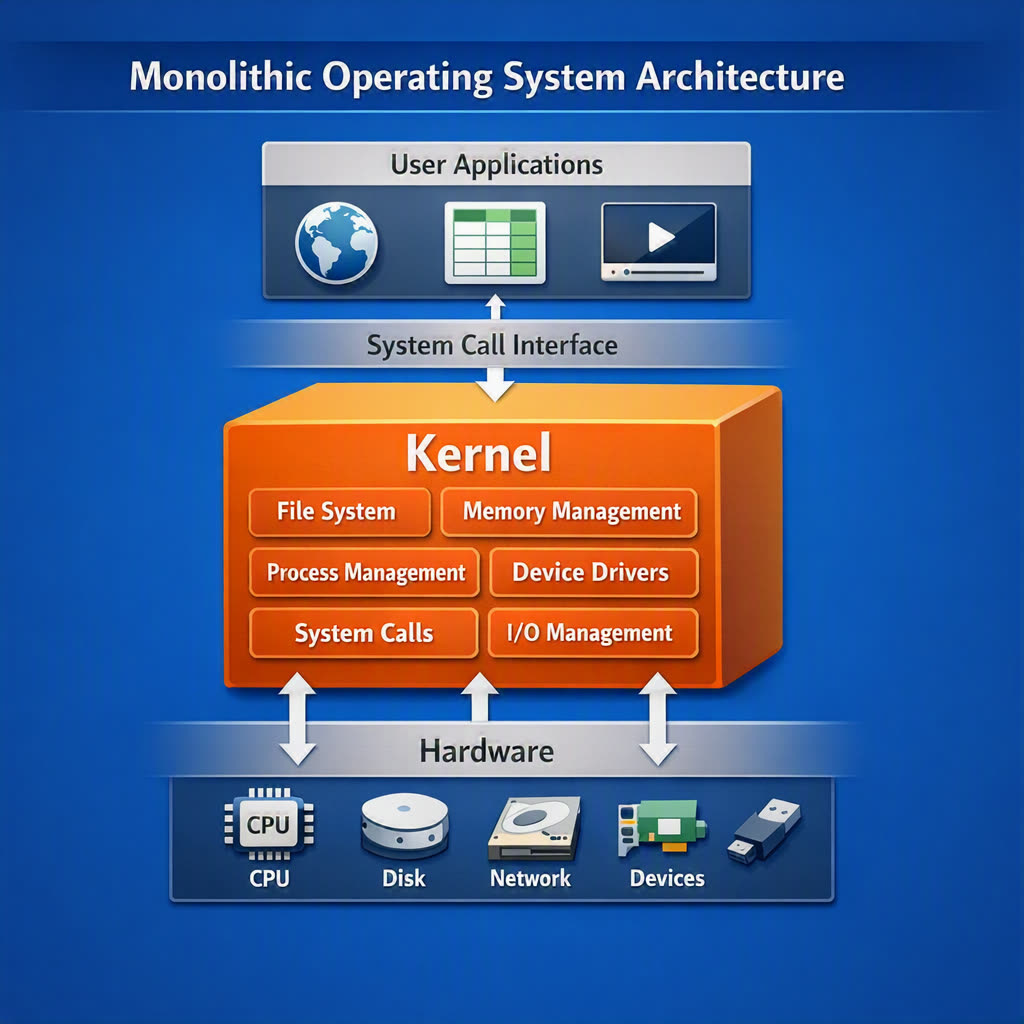
The simplest structure is no structure at all: put all kernel functionality — scheduling, memory management, file systems, network stack, device drivers — into a single static binary that runs in one address space in kernel mode. Early MS-DOS was an extreme case: no separation even between applications and the kernel, so one bad program could crash the whole machine.
Traditional UNIX is monolithic but layered into two parts: the kernel and the system programs. Everything below the system-call interface and above the hardware is the kernel. Linux follows the same model (with loadable modules, see §5).
A layered OS is broken into a number of levels. Layer 0 is the hardware; the highest layer (layer N) is the user interface. Each layer is an abstract object made of data and operations, and a layer may use only the services of the layers below it. Dijkstra's THE system (1968) was the first well-known example.
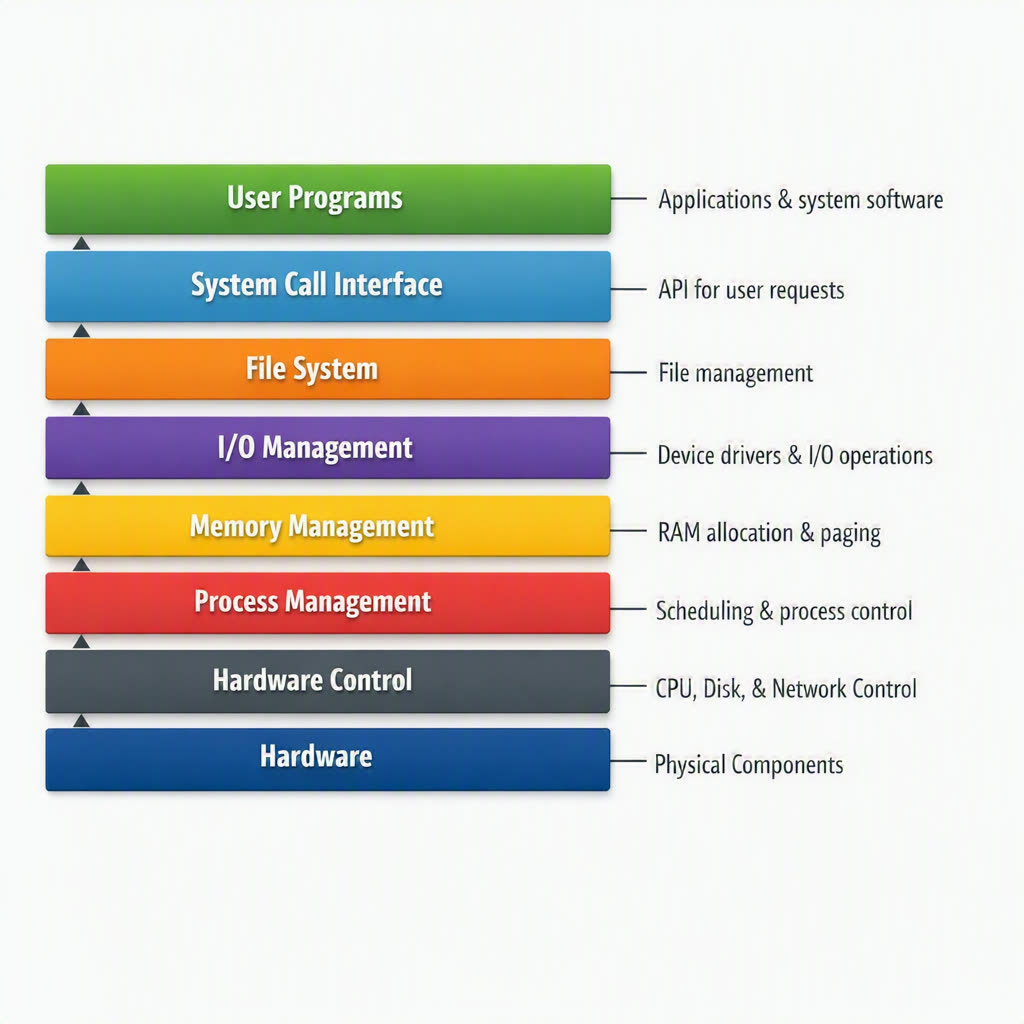
Why it is attractive: construction and debugging are simple. Debug layer 1 using only the hardware; once it is correct, debug layer 2 assuming layer 1 works, and so on. If an error appears in layer k, it must be in layer k, because everything below was already verified.
Why pure layering is rare today:
Modern systems keep the idea (well-defined interfaces, information hiding) without strict one-way layering. The network stack (TCP/IP layers) is still a good example of layering inside a kernel.
In the mid-1980s, Carnegie Mellon's Mach kernel took the opposite direction from monolithic designs: move everything that is not essential out of the kernel and into user-level programs. What remains in the microkernel is minimal: basic process and memory management and, above all, inter-process communication (message passing).

A client asking the file server to read a file
Application→ send message→ Microkernel→ File server→ Microkernel→ ApplicationThe client and the server never call each other directly — every request and reply crosses the kernel.
Mach, QNX (cars, medical devices), L4 family, MINIX 3, seL4 (formally verified).
Probably the best current methodology is the modular kernel. The kernel has a set of core components and links in additional services through loadable kernel modules (LKMs), either at boot time or while the system is running. A new file system, a USB device driver or a firewall rule engine can be added without rebuilding or rebooting the kernel.
Linux, Solaris, macOS and Windows all use modules. On any Linux machine you can see them:
$ uname -r                 # which kernel is running?
6.5.0-35-generic
$ lsmod | head -5          # modules currently loaded
Module                  Size  Used by
nls_iso8859_1          12288  1
snd_hda_codec_hdmi     94208  1
snd_sof_pci_intel_tgl  12288  0
ext4                 1069056  2
$ modinfo ext4 | head -3   # details of one module
filename:       /lib/modules/6.5.0-35-generic/kernel/fs/ext4/ext4.ko
license:        GPL
description:    Fourth Extended Filesystem
$ sudo modprobe loop       # load a module (and its dependencies)
$ sudo rmmod loop          # unload it again
A kernel module is just C code with an entry and exit function. You do not need to write one in this course, but seeing it makes the idea concrete:
#include <linux/module.h>
#include <linux/kernel.h>

MODULE_LICENSE("GPL");

static int __init hello_init(void)
{
    printk(KERN_INFO "hello_mod: loaded into the kernel\n");
    return 0;               /* 0 = success, module stays loaded */
}

static void __exit hello_exit(void)
{
    printk(KERN_INFO "hello_mod: removed from the kernel\n");
}

module_init(hello_init);    /* called by insmod / modprobe */
module_exit(hello_exit); /* called by rmmod */Real operating systems rarely follow one pure model; they combine structures to balance performance, security and usability.
Monolithic (one address space, for speed) + modular (LKMs for drivers and file systems).
Largely monolithic for performance, but keeps microkernel ideas: separate subsystems ("personalities") run as user-mode processes; supports loadable drivers.
Mach microkernel and BSD UNIX kernel combined in one kernel address space (XNU), plus dynamically loadable kernel extensions.
Modified Linux kernel at the bottom; hardware abstraction layer (HAL), native libraries and the ART runtime above it.
| Monolithic | Layered | Microkernel | Modular | |
|---|---|---|---|---|
| Core idea | All services in one kernel | Hierarchy; each layer uses only lower layers | Minimal kernel; services as user processes | Small core + loadable modules |
| Communication | Function calls | Calls to the layer below | Message passing via kernel | Function calls through module interfaces |
| Performance | Highest | Lower (layer crossings) | Lowest (messages, switches) | High |
| Fault isolation | Poor | Moderate | Best | Poor–moderate (modules run in kernel mode) |
| Extensibility | Rebuild kernel | Hard (fixed layers) | Add user-level servers | Load module at run time |
| Examples | Traditional UNIX, MS-DOS | THE, MULTICS (rings) | Mach, QNX, MINIX 3, L4 | Linux, Solaris |
Monolithic and layered structures
Recorded by Dr. Krithika L.B. Slot m1-monolithic-layered
Microkernel, modular and hybrid kernels
Recorded by Dr. Krithika L.B. Slot m1-microkernel-modular
Work through these in order after the lecture — each one expands a part of the notes with diagrams, hover notes and a quick check.
Answer each question in your own words first, then reveal the model answer.
Revealed 0Layers are verified bottom-up. When layer k is being tested, layers 0 … k−1 are already known to be correct, so any new error must be inside layer k.
Circular dependencies: the backing-store (swap) driver needs the scheduler to block while waiting for I/O, yet the scheduler may need the backing store to swap processes. Neither can be strictly below the other.
A service request becomes messages: application → kernel → server → kernel → application. Each hop involves mode switches, possibly context switches and copying, whereas a monolithic kernel simply calls a function.
Similar: a small core with services added separately. Different: modules run in kernel mode in the same address space and call each other directly, so there is no message-passing overhead — but also no fault isolation.
Both: it is a monolithic kernel (all core services in one address space) that also supports loadable kernel modules, so it is usually described as a modular monolithic or hybrid design.
Regardless of how the kernel is organised inside, applications only see it through the services it offers and the system calls that request them. Next we open that door.
Continue to 1.3 — OS services and system calls →