Operating-system services
Video coming soon
Operating-system services
Recorded by Dr. Krithika L.B. Slot m1-os-services
What services an OS offers, why user programs must ask for them, and exactly how a system call crosses from user mode into the kernel and back.
By the end of this session you should be able to:
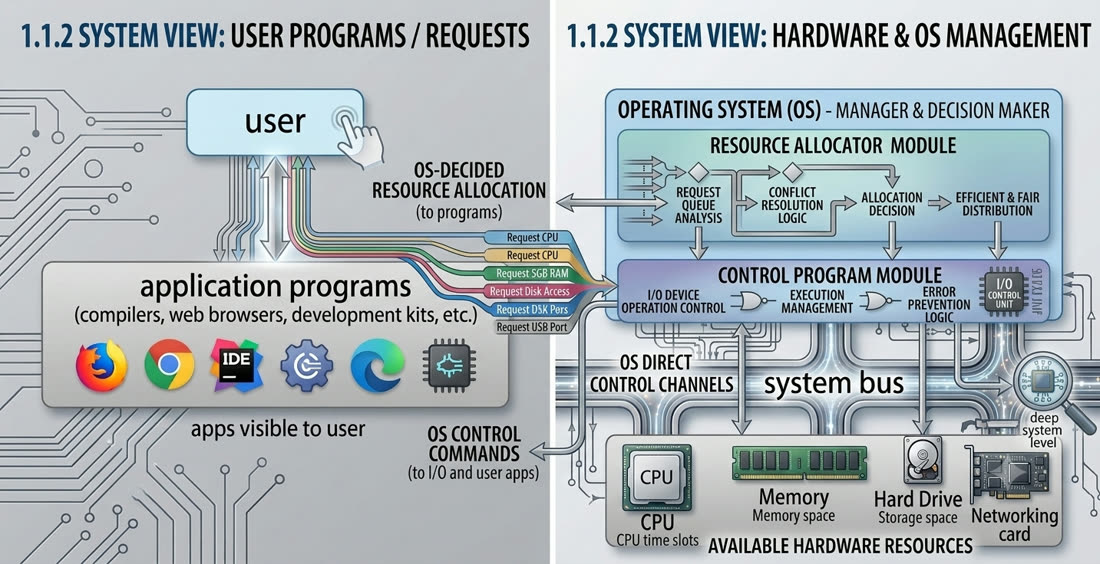
An OS provides an environment for programs to run. The exact services differ between systems, but they fall into two groups: services that make life easier for the user and programmer, and services that keep the system itself efficient and safe.
Command-line (CLI), graphical (GUI), touch-screen, or batch interface.
Load a program into memory, run it, end it normally or abnormally.
Programs cannot drive devices directly; the OS performs I/O for them.
Create, delete, read, write, search and list files and directories; manage permissions.
Exchange information between processes on the same machine or over a network (shared memory, message passing).
Detect and handle errors in CPU, memory, devices and user programs (e.g. divide by zero, disk read error).
Divide CPU cycles, memory, storage and devices among concurrent users and jobs.
Keep track of which users use how much of which resource (billing, statistics, tuning).
Control all access to resources; authenticate users; defend against outside attacks.
All of these services are eventually reached through system calls.
The command interpreter (on Linux, a shell such as bash) reads a command and executes
it. Most commands are not built into the shell — rm file.txt makes the shell find the program
/bin/rm, load it and pass it the argument. That way new commands can be added without changing the shell.
GUIs (desktop metaphor, mouse) and touch interfaces (gestures) are friendlier, while CLIs are faster for experts and easy to
automate with shell scripts — which you will write in Lab 1.
If any program could execute any instruction, a single buggy program could overwrite the kernel or another program. So the hardware provides at least two modes, selected by a mode bit:
Intel x86 CPUs actually have four protection rings (Linux and Windows use ring 3 for user code and ring 0 for the kernel); CPUs with virtualization support add a further mode for the hypervisor (Module 5).
A system call is the programmatic way a process requests a service from the kernel. It is executed by a special trap instruction (syscall on x86-64, svc on ARM) that switches the CPU to kernel mode and jumps to a fixed kernel entry point.
Even a trivial program makes many system calls. Copying one file to another (cp in.txt out.txt) needs:
write to screen, read from keyboard)open the input file — abort if it does not existcreat/open the output file — abort if it cannot be createdread from input, write to output, until end-of-fileclose both files, write a completion message, exit normallyProgrammers rarely issue system calls directly. They use an Application Programming Interface (API) —
the POSIX API on Linux/macOS (provided by the C library, libc) or the Windows API.
A library function such as printf() eventually calls the write() wrapper, which loads the
system-call number into a register and executes the trap. APIs are preferred because programs become
portable and the API is easier to use than raw system calls.
The system-call interface uses the number as an index into a table of kernel functions, runs the function in kernel mode, and returns the result (or an error code) to user mode.
#include <stdio.h>      /* printf        - C library (API)         */
#include <unistd.h>     /* write, getpid - POSIX system calls      */

int main(void)
{
    printf("Hello via printf (library)\n");
    fflush(stdout);                                   /* push the library buffer out */
    write(1, "Hello via write (system call)\n", 30);  /* fd 1 = standard output      */
    printf("My process id is %d\n", getpid());
    return 0;
}$ gcc syscall_demo.c -o syscall_demo
$ ./syscall_demo
Hello via printf (library)
Hello via write (system call)
My process id is 4211
$ strace -e trace=write,getpid ./syscall_demo
write(1, "Hello via printf (library)\n", 27) = 27
write(1, "Hello via write (system call)\n", 30) = 30
getpid() = 4212
write(1, "My process id is 4212\n", 22) = 22
+++ exited with 0 +++Notice that printf itself is not a system call — strace shows it turned into write.
The process id differs between the two runs because each run is a new process.
A system call often needs more information than its number — a file name, a buffer address, a byte count. Three methods are used:
Put the parameters in CPU registers. Fastest, but limited by the number of registers. Linux x86-64 passes up to six arguments this way.
Store parameters in a block in memory and pass the block's address in a register. No limit on number or length.
The program pushes parameters onto the stack; the OS pops them off. Also unlimited.
System calls can be grouped into six major categories. The same service has different names on Windows and UNIX, but the idea is identical.
| Category | Typical operations | Windows | UNIX / Linux |
|---|---|---|---|
| Process control | create, terminate, load, execute, wait, allocate memory | CreateProcess()ExitProcess()WaitForSingleObject() | fork(), exec()exit()wait() |
| File management | create, delete, open, close, read, write, get/set attributes | CreateFile()ReadFile(), WriteFile()CloseHandle() | open()read(), write()close() |
| Device management | request/release device, read, write, get/set attributes | SetConsoleMode()ReadConsole() | ioctl()read(), write() |
| Information maintenance | get/set time, date, system data, process attributes | GetCurrentProcessID()SetTimer(), Sleep() | getpid()alarm(), sleep() |
| Communications | create/delete connection, send/receive messages, shared memory | CreatePipe()CreateFileMapping()MapViewOfFile() | pipe()shm_open()mmap() |
| Protection | get/set permissions, allow/deny user access | SetFileSecurity()InitializeSecurityDescriptor() | chmod()umask(), chown() |
fork(), wait(), exit() → Lab 3 · pthread_create() → Lab 4 · shmget()/shmat() → Lab 8 · open(), read(), write(), lseek(), close() → Lab 15. Each lab exercises one row of this table.
Above the kernel sit system programs (system utilities) that give a convenient environment: file managers
(ls, cp), status information (date, df, top), editors,
compilers and debuggers (gcc, gdb), program loaders, communication tools (ssh) and
background services (daemons). For most users the system programs are the operating system — but every one of them
is just a user-mode program built on system calls.
Operating-system services
Recorded by Dr. Krithika L.B. Slot m1-os-services
System calls and their types
Recorded by Dr. Krithika L.B. Slot m1-system-calls
Work through these in order after the lecture — each one expands a part of the notes with diagrams, hover notes and a quick check.
Answer each question in your own words first, then reveal the model answer.
Revealed 0If a user program could issue I/O directly it could read another user's disk blocks, overwrite the kernel on disk, or leave a device in an inconsistent state. Making I/O privileged forces every request through the OS, which checks permissions first.
No. printf() is a C-library (API) function that formats text in a user-space buffer. When the buffer is flushed it calls write(), whose wrapper executes the actual system-call trap.
Portability (the same POSIX code compiles on any POSIX system even if system-call numbers differ) and convenience (the API hides register set-up and error handling).
A block (table) in memory with its address passed in a register, or the stack — registers alone are too few (Linux on x86-64 passes at most six arguments in registers).
getpid → information maintenance · pipe → communications · chmod → protection · wait → process control · ioctl → device management.
A system call is one way the CPU enters the kernel — deliberately, from software. But the kernel must also take control when a device finishes, a timer expires or a program faults. Next: interrupts, the design principles behind all of this, and how the kernel gets into memory in the first place.
Continue to 1.4 — Interrupts, design issues, building and booting →